How we built an AI outreach pipeline that researches every lead before it writes
An AI agent finds businesses that fit, proves a real problem on their website, verifies the owner's email and drafts a message only they could get. A person approves every send. Here's the structure, with boilerplate you can adapt.
Finding clients used to eat two to four hours of our day. Now we type one command, and an AI agent does the research a good salesperson would do: it finds businesses that fit, opens their website, proves a real problem with a link and a date, finds the owner, and drafts a message only that business could get. Nothing goes out until we approve it.
This post walks through how it works, stage by stage, with boilerplate you can adapt. We’re not sharing our exact code, because the right setup depends on your niche, your tools and how comfortable you are with code. The structure is what matters, and it runs on Claude Code or OpenCode, even with free models.
Scope of this post. We use this pipeline every day for our own outreach. Every example in this post comes from a demo version we built for testing, with fake businesses on
.exampledomains, so no real company or person appears here. We’re not quoting reply rates yet: the current version has only been running for a few days.
The short version
- Most AI outreach skips research. This pipeline does the research first and writes last.
- Every claim in a message must point to a finding saved with its URL and the date it was checked.
- No guessed emails. Every contact has a source and must check out before anything is sent.
- A person approves every message. Scheduled runs only save drafts.
- One rulebook file and one small SQLite database keep all the stages in line.
Why most AI outreach gets ignored
Most AI outreach tools do the cheap part, writing, and skip the expensive part, research. You get “Hi {FirstName}, loved your website” sent to thousands of people, and inboxes have learned to ignore it.
The numbers back this up. A 2026 study of B2B cold email found the median reply rate fell to 2.1%, down from 4.7% in 2022. The same study found a research-based first line lifted replies by 184%, while a role-based one lifted them by only 31% (Visionary Marketing, 2026).
So the goal is to do the research on every lead, which is exactly the boring, repeatable work an agent is good at. Our pipeline spends most of its effort before it writes a single word.
The pipeline at a glance
- 1. Find: Searches in a real browser, dedupes against the database, drops obvious misfits.
- 2. Qualify: Reads the whole site and proves a real problem, saved with URL and date.
- 3. Verify: Finds the owner. No guessed emails: every contact has a source and must check out.
- 4. Write: Drafts a message built only from recorded evidence, then self-checks it.
- 5. You approve: Edit, approve or drop each draft. Nothing sends without this.
- 6. Send and log: Re-checks the lead, sends in small batches, logs the message ID.
- 7. Follow up: Adds one new point per follow-up, two at most. Replies go to you.
Four stages of research come before anything is written. Every stage reads from and writes to one small database.
One rulebook every stage follows
The pipeline is a set of agent skills: small instruction files the agent loads when it needs them. One of them, the rulebook, holds every shared rule. Each stage skill loads it first, and if a stage disagrees with the rulebook, the rulebook wins. To change how outreach behaves, we change one file.
The rulebook names capabilities, not tools. It says “you need a DATABASE, a BROWSER and EMAIL”, and each agent maps those to whatever it has. That’s why the same skills run on Claude Code and on OpenCode with free models.
Peek at the rulebook outline
skills/pipeline-rules/SKILL.md (outline)
# pipeline-rules (SKILL.md)

## 0. Capabilities
| Capability | Must do                                     | Examples                       |
|------------|---------------------------------------------|--------------------------------|
| DATABASE   | SELECT / INSERT / UPDATE on pipeline.db     | SQLite MCP server, sqlite3 CLI |
| BROWSER    | open pages, read text, click, type          | Claude in Chrome               |
| EMAIL      | search, read headers, send, reply in thread | Gmail / Zoho / Outlook MCP     |
| VERIFIER   | check an email is deliverable (optional)    | any verification API           |

State lives only in the database. Never in chat or local notes.

## 1. Database rules    ## 2. Statuses    ## 3. Evidence rule
## 4. Contacts          ## 5. Channels    ## 6. Daily caps
## 7. Writing playbook  ## 8. Approval    ## 9. Replies
Next to it sits a short campaign.md: who you’re looking for, what you offer, who to skip, and your signature. Change the campaign there and the rules stay the same.
A small database holds all the state
Every lead, draft and send is written to a local SQLite file the moment it happens. If a session crashes halfway, nothing is lost, and the next run picks up where the last one stopped. Five tables are enough:
data/schema.sql
CREATE TABLE leads (
  id TEXT PRIMARY KEY, business TEXT, url TEXT, category TEXT, city TEXT,
  owner TEXT,          -- "Name — role — where it was seen"
  contact TEXT, channel TEXT, emailStatus TEXT, contactSource TEXT,
  status TEXT DEFAULT 'Found', priority TEXT,
  problem TEXT, offer TEXT,
  evidence TEXT,       -- one line per finding: finding | URL | checked date
  notes TEXT,          -- append-only, dated lines
  sentDate TEXT, followUp TEXT, followUpCount INTEGER DEFAULT 0
);

-- every message ever drafted
CREATE TABLE send_queue (
  id INTEGER PRIMARY KEY, leadId TEXT, type TEXT, channel TEXT, recipient TEXT,
  subject TEXT, body TEXT, findingUsed TEXT, evidenceUrl TEXT,
  status TEXT DEFAULT 'Drafted'   -- Drafted -> Approved -> Sent | Failed | Dropped
);

CREATE TABLE search_log (id INTEGER PRIMARY KEY, runDate TEXT, query TEXT, results INT, newLeads INT);
CREATE TABLE activity   (id INTEGER PRIMARY KEY, ts TEXT, stage TEXT, leadId TEXT, message TEXT);
CREATE TABLE settings   (key TEXT PRIMARY KEY, value TEXT);  -- daily target, caps
Each lead moves through a fixed set of statuses, and each status belongs to one stage. Only that stage may move a lead out of it, which keeps the stages from stepping on each other.
All seven statuses, and which stage owns each
| Status | Means | Picked up by |
|---|---|---|
| Found | URL captured, review still to do | Qualify |
| Ready | Problem proven, contact verified | Send |
| Contacted | First message sent | Follow-ups |
| Replied / In discussion | Warm. A person answers, never the agent | You |
| Later | Look again on a set date | Qualify |
| Manual | No contact channel found | You |
| Skipped / Declined / Closed | Done, with the reason in notes | — |
Two rules keep the data trustworthy: notes and evidence are append-only, and rows are never deleted.
Stage 1: Find
The agent searches the web in a real browser, the way you would, and adds new businesses as Found. It doesn’t review deeply here; it only collects and filters.
How a search run works, step by step
- Check what was already searched. It reads
search_logand skips any query run in the last 14 days. Queries that produced leads get new variations; ones that keep returning nothing are dropped. - Build queries from the campaign. Niche + city + an intent phrase that hints at the problem you solve, for example
yoga studio Austin "call to book"orgym Leeds timetable pdf. - Normalise and dedupe. Every URL is cut down to its domain and checked against the database before inserting. A duplicate is ignored, never overwritten.
- A 30-second fit check. Homepage only. Obvious misfits (chains, closed sites, businesses that already have what you sell) go in as Skipped with the reason. When in doubt, it’s Found.
- Log every query with its result count and new leads, so the next run learns which searches work.
Many found leads get filtered out later (about a third in our own runs), so the agent aims to find about three times the number of messages still needed that day.
Stage 2: Qualify, prove a real problem
This is where the pipeline earns its keep. The agent works one lead at a time and acts like a careful visitor:
- Reads the whole site: home, about, pricing, booking, contact, FAQ and every footer link.
- Tries the visitor’s path: can someone find what they need, see the price and act on it, on a phone-sized window too? Does the contact form confirm when you submit it (with test data, stopping before anything real)?
- Records every finding as one line of evidence: what it saw, the exact URL, and the date it checked.
- Gives a verdict: Pitch, Skip or Later, plus a priority.
The evidence rule. If there’s no evidence line, the message can’t mention it. Every claim must point to a recorded finding with its URL and date. A finding older than three days is checked again right before sending; if the business fixed it, the agent uses the next one. This rule is what makes messages specific, and it stops the AI from inventing problems.
leads.evidence (demo lead)
evidence:
pricing page says "Call us to book your first class", no booking link | https://ironhouse.example/pricing | checked 2026-11-19
timetable link downloads a PDF dated March 2024 | https://ironhouse.example/timetable.pdf | checked 2026-11-19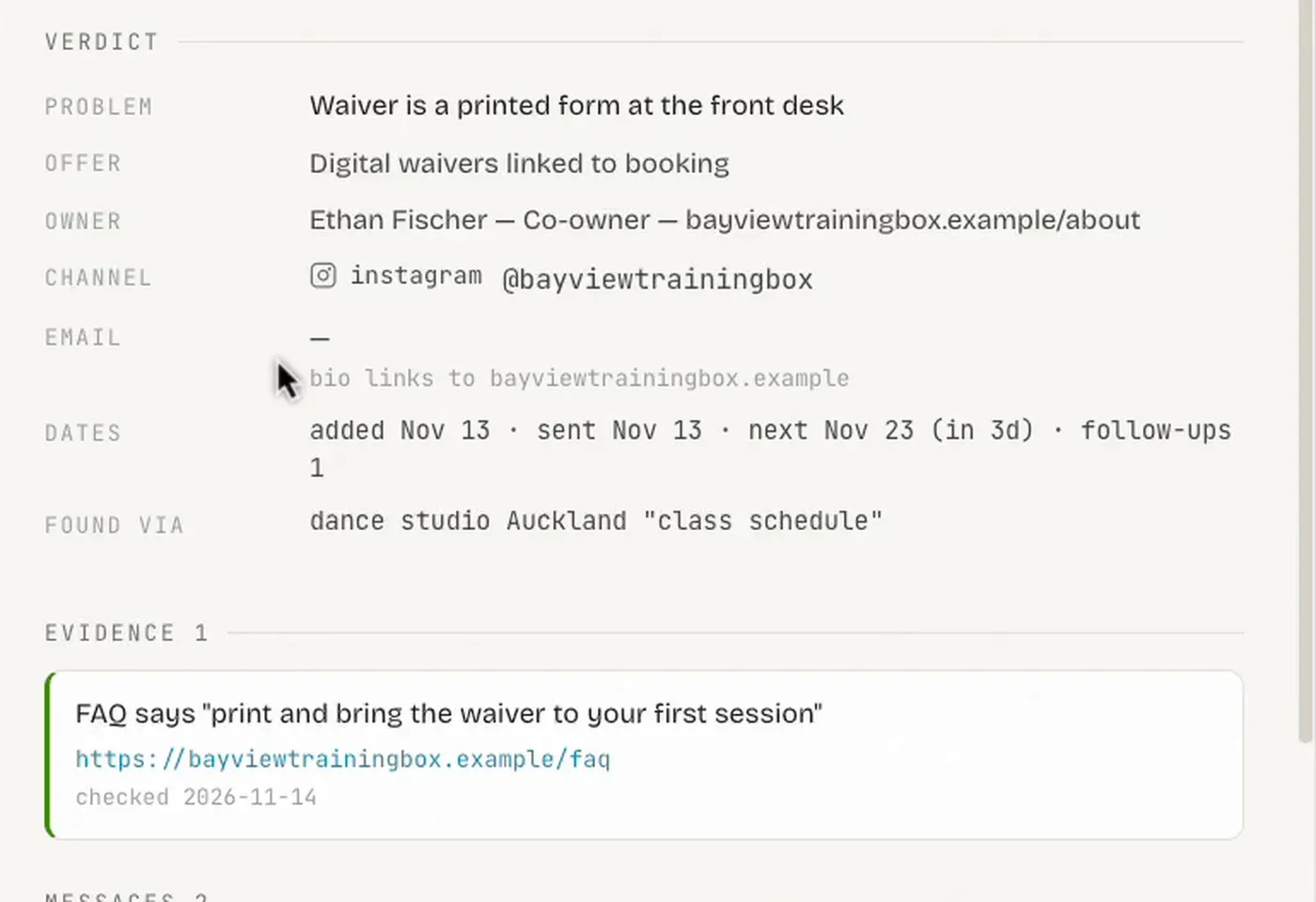
The same lead as the dashboard shows it. Demo data: the business and the owner are made up.
Stage 3: Find the owner and verify the contact
A great message sent to an inbox nobody reads is wasted, and a guessed email that bounces hurts your sender reputation. So this stage has strict rules:
- Never guess an email. No
firstname@domainpatterns. Every contact needs a source: the page or tool it came from. - Find the person who decides. The owner or founder from the about page, team page or social profiles, saved as
Name — role — where it was seen. - Free checks first. Is the address listed on an official page? Does the domain have mail (MX) records? A paid verifier runs only for the one address you’ll actually use.
- Only “Valid” gets sent to. Risky results are flagged for you and held back.
- Pick a channel in a fixed order: the owner’s verified email, then the contact form, then a social DM (drafted only), then LinkedIn as the last option.
A lead becomes Ready only when four things are true: evidence checked today, the owner identified, a verified channel, and no other lead already using that contact. If research finds no channel at all, it goes to Manual with a note of everything that was checked, so you can decide whether to call.
Stage 4: Write a message only they could get
Every message follows the same four-part formula:
- Observation (first line, under 20 words): one specific thing on their site, taken from the evidence. This line is the inbox preview, so it’s about them.
- Implication (one sentence): what it costs them, concrete and not dramatic.
- Offer (one or two sentences): the fix, plus the one bigger thing you’d build.
- An easy question they can answer in one word. Never ask for a call in the first message.
Here’s a draft the agent wrote during a test run on one of our demo sites:
draft #111 · Ironhouse Strength Club (demo site)
Hi Marcus,

Ironhouse's pricing page says to call to book a first class, and the phones are
only answered Mon–Fri, 9 to 5. The gym is open 5am to 10pm, so anyone who decides
at 7pm or on a Saturday has to wait, or forgets. The timetable is also a PDF
dated March 2024.

We build online booking for independent gyms: a free-first-session flow that books
a real slot, plus a live timetable that works on a phone.

Would that be useful for Ironhouse?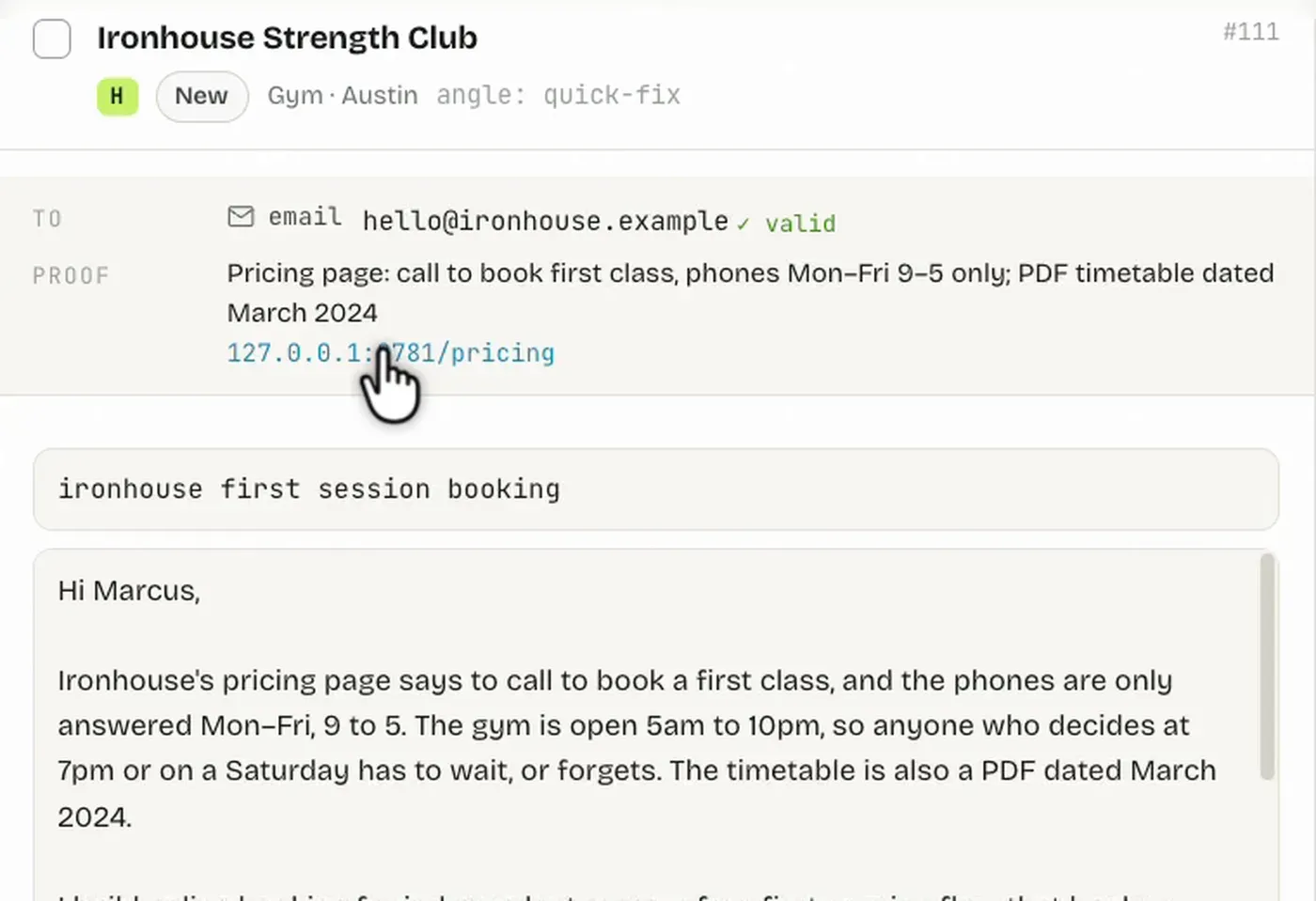
In the dashboard, the proof sits right above the draft, so checking a claim takes one click.
The self-check every draft must pass
- Swap test: if you could send it to another business by changing the name, rewrite it.
- Preview test: the first ~80 characters mention them.
- Evidence test: every claim matches a recorded finding.
- Length test: a single question, in 50–120 words for email or under 60 for a DM.
- Banned phrases: “Hope this finds you well”, “Came across your website”, buzzwords, flattery, fake urgency.
Stage 5: Nothing sends until we approve it
The agent never sends on its own. Every draft lands in the send_queue as Drafted, with the recipient, the finding it used and the evidence link. We approve it in one of two ways:
- In the chat: the agent lists the queue and we reply “send all”, “send 12–18” or paste edits.
- In a small local dashboard: a web page that reads the same database. It shows each draft with its proof link and lets us edit, approve or drop it. Approving only marks the row Approved; the agent sends it when we say “send approved”.
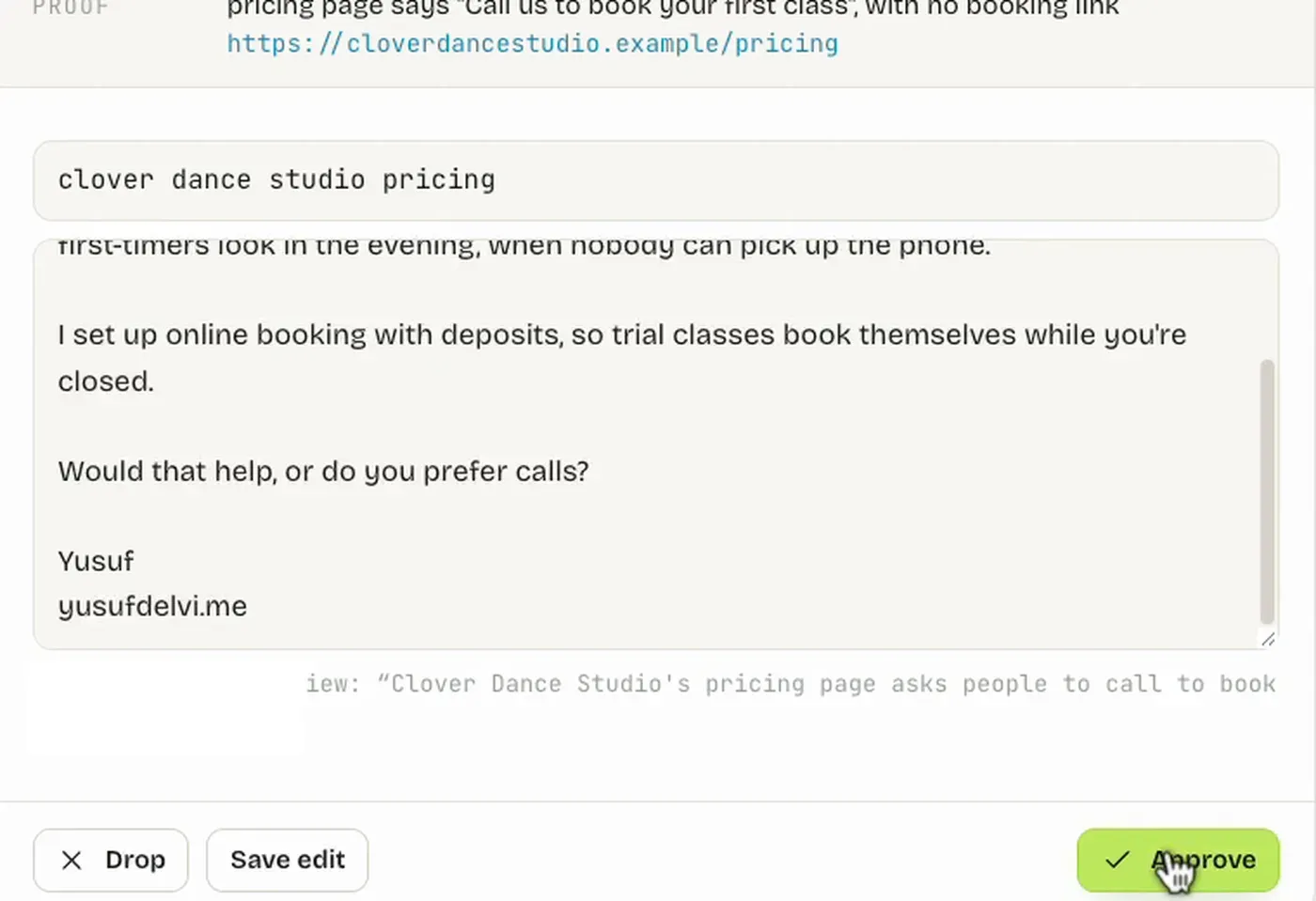
Drop, edit or approve. Approving only marks the draft; sending is a separate step.
The dashboard is a few hundred lines: a Python server using only the standard library, plus one HTML page. It also shows the day’s progress against the target, the pipeline by status, follow-ups due, and a live log of every step the agent took.
Scheduled or unattended runs go one step further: they only save drafts and never send. Approval is the line we don’t let the automation cross.
Stages 6 and 7: Send, log, follow up
When we say “send approved”, the agent checks every item again, right before sending:
- Did they already reply? It searches the inbox for their address and domain.
- Did someone else already contact this address? One business, one conversation.
- Is the finding still true? Older than three days, it re-opens the page.
- Is the channel still valid?
Then it sends, and immediately logs the message ID, the date and the next follow-up date. Emails go in batches of 10, at least 10 minutes apart, with a bounce check after each batch.
Follow-ups go through the same approval, with two rules of their own: each follow-up adds one new point (a second finding or a small idea, never “just bumping this”), and two follow-ups at most. Every run starts with an inbox sweep. A reply moves the lead to Replied, and from then on the agent stays out of it. We answer warm leads ourselves.
Safety rules we wouldn’t skip
Automation that sends messages can burn your domain, your accounts and your reputation in a day. These rules are built into the rulebook:
| Rule | Why |
|---|---|
| A person approves every message | You stay accountable for what goes out under your name |
| Social DMs are drafted, never sent by the agent | Platforms restrict automated messaging; you paste DMs yourself |
| Daily caps per channel, kept in the database | Protects your email domain and accounts from looking like spam |
| Emails in batches of 10, bounce check after each | Stops a bad list before it damages your sender reputation |
| Stop if bounces pass 3% or a platform warns you | The agent reports it instead of pushing on |
| No guessed emails; every contact has a source | Fewer bounces, and no writing to a stranger’s inbox by accident |
| Never open or record secrets found on a site | Keys and tokens aren’t yours to handle, even when they’re public |
| Warm replies are answered by a person | The agent’s job ends when a conversation starts |
Set it up yourself
You can build a working version in an afternoon. Start small: one niche, one city, email only.
project layout
outreach/
├── campaign.md                 # niche, offer, who to skip, signature
├── skills/
│   ├── pipeline-rules/SKILL.md
│   ├── pipeline-find/SKILL.md
│   ├── pipeline-qualify/SKILL.md
│   ├── pipeline-send/SKILL.md
│   ├── pipeline-followups/SKILL.md
│   └── pipeline-run/SKILL.md   # calls the others in order
└── data/pipeline.db- Write
campaign.md. Be concrete about who is a good fit, who to skip and the one gap you look for. - Create the database from the schema above with
sqlite3 data/pipeline.db < schema.sql, and add your daily target and caps tosettings. - Write the rulebook first, then one short skill per stage. Each stage skill starts with “load pipeline-rules first” and lists its steps and what it writes to the database.
- Connect the capabilities your agent needs: a SQLite MCP server (or the
sqlite3CLI), a browser tool such as Claude in Chrome, and your email account. In Claude Code, put the skills under.claude/skills/in the project. - Test on fake data before real people. We built a few fake business websites with planted problems (a PDF timetable, a broken contact form) and ran the whole pipeline against them first.
- Run it attended for the first week. Read every draft, edit freely, and move any edit you keep making into the writing playbook.
Then type /pipeline-run and watch it work.
What it changed
The research that used to take us two to four hours a day now runs while we do client work. Our part is the part that should stay human: reading drafts, approving them, and answering the people who reply.
The biggest lesson wasn’t technical.
Outreach got better when we gave the AI less freedom: one rulebook, proof for every claim, and a person in front of the send button.
Questions people ask
Does it send messages on its own?
No. Every draft waits in a queue until we approve it, and scheduled runs only save drafts. Social DMs are never sent by the agent at all: we paste them ourselves.
Which AI tools does it need?
Any agent that can load skills and reach three capabilities: a database, a browser and email. We run the same skills on Claude Code and on OpenCode with free models.
Will it hurt email deliverability?
Not if you keep the safety rules: daily caps per channel, batches of 10 with a bounce check after each, a stop at 3% bounces, and no guessed addresses.
What reply rate does it get?
We’re not quoting one yet. The current version has only been running for a few days, and a number from that is not worth much. What we can say is that it saves us two to four hours of research a day.
Can you share the exact code?
We’re not sharing it, because the right setup depends on your niche, your tools and how comfortable you are with code. The structure and the boilerplate in this post are enough to build your own.
If you want a pipeline like this built around your own business, your niche, your tools and your inbox, that’s the kind of thing we build.